
Sell Online with Google Sites: The Complete Guide (Shop, Cart and Checkout)
Last updated: November 2026
Quick answer
Google Sites has no shop, cart or payment block of its own. To sell from a Google Site, you can link to a shop somewhere else, add simple payment buttons, or run a real shop inside the Google Site. With Swiffle Grid PRO, your products come live from WooCommerce or a Google Sheet, visitors fill a real cart in your Google Site, pay on your WooCommerce checkout, and come back to your Google Site.
Google Sites is free, simple and shared with your whole team: perfect for a school, an association, a maker or a small business. The day you want to sell a T-shirt, a ticket or a handmade piece, you hit its limit. This guide explains your options and how to add a real shop, step by step.
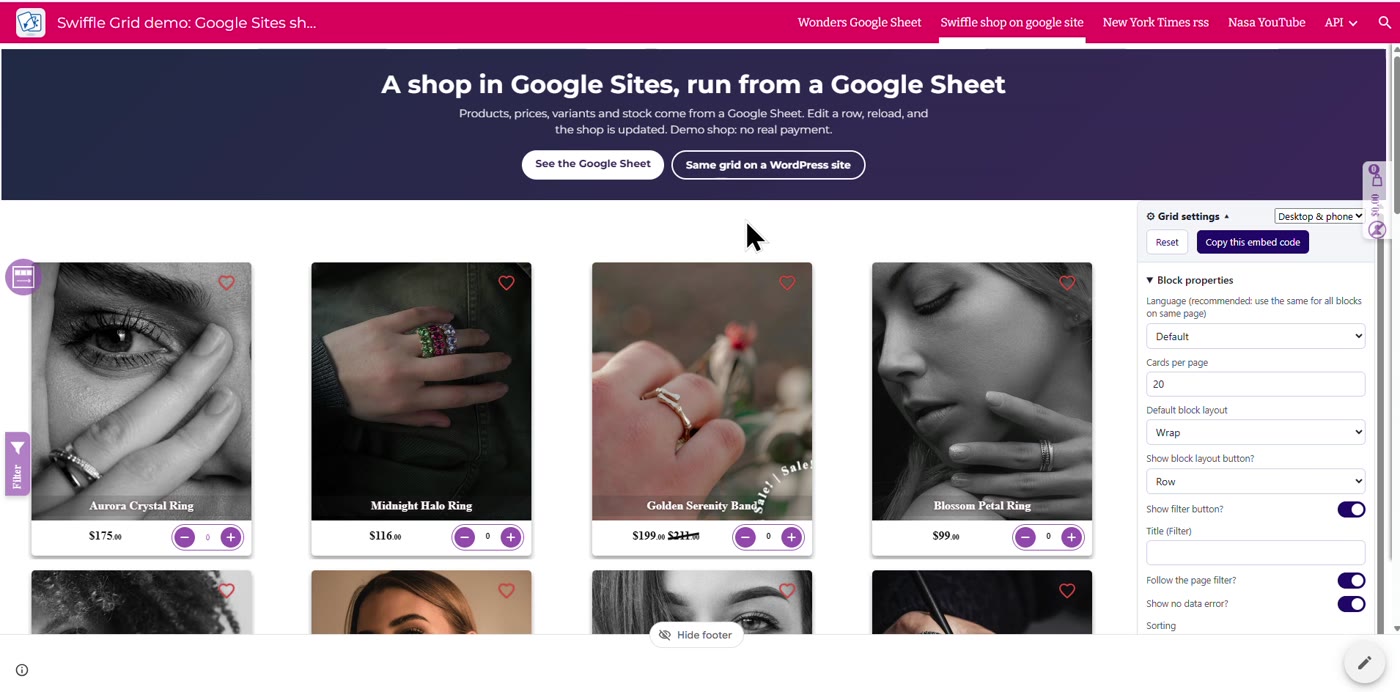
A real shop inside a Google Site.
What Google Sites can and cannot do
| Google Sites can | Google Sites cannot |
|---|---|
| Show text, pictures, videos, Google Docs, Sheets and Forms | Hold products with prices, sizes and stock |
| Show web content in an embed, on computers and phones | Keep a cart from page to page |
| Be edited by a whole team, for free | Take payments or manage orders |
Your options to sell from a Google Site
| Option | What visitors get | Limits |
|---|---|---|
| A link to a shop on another website | A button that leaves your Google Site | Visitors leave your site, your branding and your content |
| Simple payment buttons | One button per product | No cart, no sizes, no stock, orders to follow by hand |
| A shop inside the Google Site with Swiffle Grid PRO | Product cards, sizes, live stock, a cart kept from page to page, checkout, then back to your Google Site | Needs a WordPress site with WooCommerce behind it |
How it works with Swiffle Grid
- Choose your products: your WooCommerce products, or a Google Sheet with one product per row.
- Build the grid on your WordPress site with the Swiffle Grid block, and copy its embed code.
- Paste it in Google Sites: Pages, +, New full page embed. The shop fills the screen on computers and phones.
- Allow the Google Site once in the Swiffle Grid settings, and start selling.
Step by step, with a video: How to Add a Shop to Google Sites with a Google Sheet. Already running WooCommerce? See WooCommerce on Google Sites.
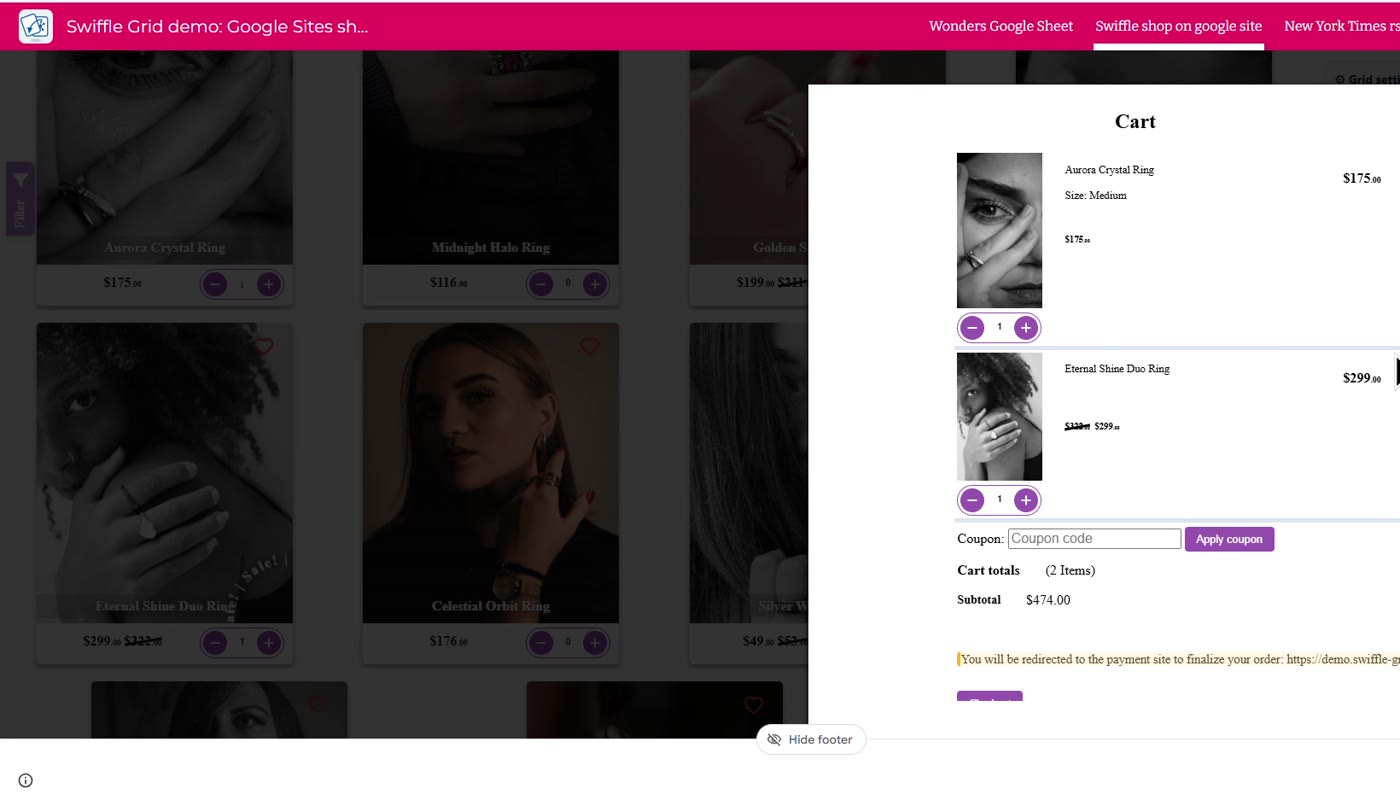
The cart, inside the Google Site.
What your buyers get
- Product cards with pictures, prices, sizes and other options.
- Live stock: a sold-out product cannot be ordered.
- A real cart, kept from page to page and when the visitor comes back.
- Checkout on your WooCommerce shop, with the payment methods you choose, then back to your Google Site.
- Swipe cards on phones.
And for you: Sales by site shows which Google Site, and which page, brought each order.
Guides by use case
Schools and nonprofits
A fundraising shop, news and archives for your school or association.
Read the guideArtisans and makers
A portfolio of your creations and a shop for your pieces.
Read the guideWooCommerce shops
Your existing WooCommerce shop, inside a Google Site.
Read the guideResellers and partners
Your products on the Google Sites of your resellers, with sales tracked per site.
Read the guideWeb agencies
One plugin for all the Google Sites of your clients.
Read the guideTry it
See a shop inside a Google Site Try it yourself Swiffle Grid plans
Frequently asked questions
- Can you sell online with Google Sites?
- Not with Google Sites alone: it has no shop, cart or payment block. With the Swiffle Grid PRO plugin, a real shop runs inside the Google Site through a full page embed: products, prices, sizes, stock and a cart, with checkout on a WooCommerce shop.
- Does Google Sites have e-commerce features?
- No. Google Sites can show text, images, videos and embedded content, but it cannot hold products, a cart or orders. Selling needs a shop elsewhere; Swiffle Grid shows that shop inside the Google Site.
- Where do the products come from?
- From your WooCommerce shop, or from a Google Sheet with one product per row. In both cases prices and stock are live: change them at the source and the Google Site shows it.
- Do I need a WordPress site?
- Yes. The orders and payments are handled by WooCommerce on a WordPress site. Most hosts install WordPress in one click, and one WordPress site can feed many Google Sites.
- Does it work on phones?
- Yes. A full page embed fills the screen on computers and phones, the cart is kept from page to page, and visitors can browse the products as swipe cards.
- Is it free?
- The free Swiffle Grid plugin shows posts, spreadsheets, RSS feeds and YouTube channels in a Google Site. Selling, with cart and checkout, comes with Swiffle Grid PRO, with a 14-day free trial.