
Swiffle Grid for Web Agencies: One Plugin, Unlimited Client Use Cases
Last updated: November 2026
Quick answer
Swiffle Grid turns WordPress into the content hub of your client projects. Build a grid once with Gutenberg or Elementor, from posts, WooCommerce, CSV, Excel, Google Sheets, RSS or an API, then show it on the client’s WordPress site, on their Shopify, Webflow, Wix or Google Site, or on partner websites. Clients update the source, every site follows. A single Swiffle Grid license can keep content synchronized across an unlimited number of websites, with no license required on the synchronized sites.
Every client asks for something slightly different: a product catalog, a directory, a shop on a site that is not WordPress, a team page fed by a spreadsheet, a news feed on three partner sites. Building each one by hand means custom code to write, test and maintain for years. Swiffle Grid gives your agency one tool for all of them, with the same workflow every time.
One plugin, unlimited client use cases
Product catalogs
A catalog from a CSV or Excel file, as cards with pictures and details.
See howDirectories and maps
Members, stores or partners as cards, with an interactive map and no Google Maps API key.
See howRemote WooCommerce shops
The client’s WooCommerce products, cart and checkout on any other website.
See howGoogle Sheets
One spreadsheet the client already uses, shown live on all their websites.
See howPartner and reseller websites
The client’s shop on each reseller’s site, with sales tracked per website.
See howGoogle Sites
A real shop, news or archives inside the Google Site of a school, an association or a small business.
See howNews and posts everywhere
WordPress posts, RSS feeds or a YouTube channel as cards on any website.
See howAPIs and business data
JSON feeds, CRM, ERP or SaaS data through a custom connector.
See howBuild once, deploy everywhere
- Design in WordPress, with the Gutenberg block or the Elementor widget: source, layout, card style, flip or swipe.
- Copy the embed code. One line of script and one tag, nothing to install on the target site.
- Paste it on any client website: WordPress, Shopify, Webflow, Wix, Squarespace, Google Sites or plain HTML, and allow that website once.
- Hand over the source: the client edits posts, products or a spreadsheet, and every website showing the grid is up to date.
Need the same data with a different look on each site? Send the embed code with its setup bar: the layout, card shape and colors can be adjusted on each page, without touching the data.

The same products, adapted to a partner’s website.
Why it fits agency work
- No custom code to maintain per client: one plugin, updated on WordPress.org.
- Clients stay autonomous: they edit WordPress or a spreadsheet, never code.
- Works with the builders you already use: Gutenberg and Elementor, with the same settings.
- Mobile first: visitors can switch between grid, flip and swipe cards.
- Reporting for e-commerce clients: Sales by site shows which website and which page brought each order.
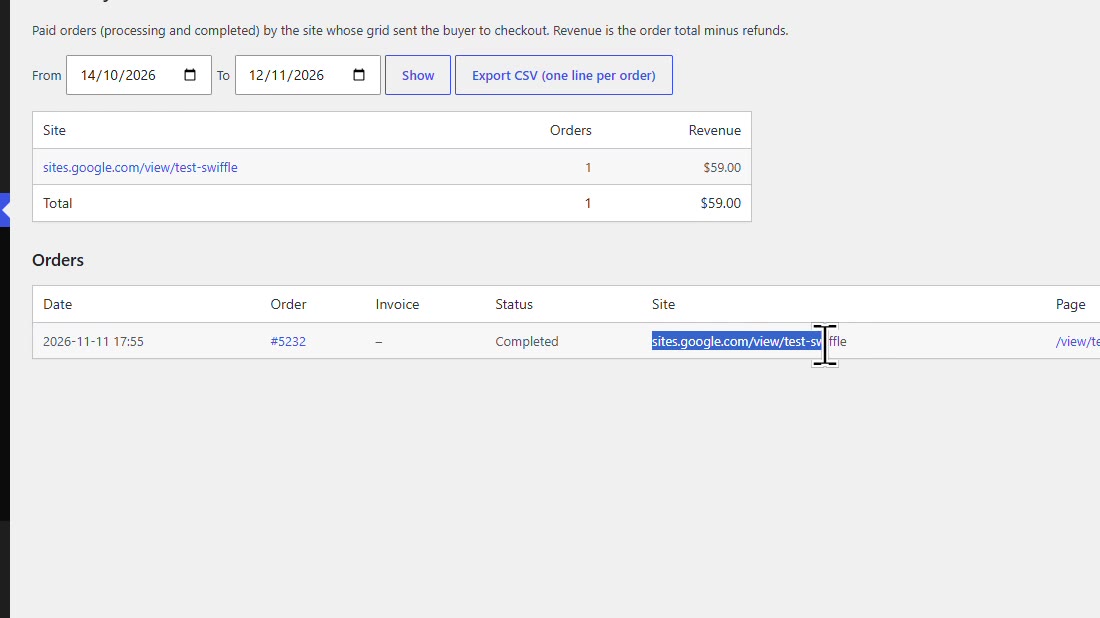
Sales by site: orders and revenue per website, ready for client reports.
Licenses for agencies
| Need | Solution |
|---|---|
| Posts, CSV, Excel, RSS and YouTube on any website | The free plugin on WordPress.org, for as many sites as you like |
| WooCommerce with cart and checkout, live Google Sheets, custom API connectors | Swiffle Grid PRO: STORE, CONNECT or BUNDLE, for 1, 5, 10 or 50 sites |
| Try PRO on a client project first | 14-day free trial on 1-year, 1-site plans, no credit card needed |
Try it
See the live demos Swiffle Grid plans
Frequently asked questions
- Can I use Swiffle Grid on my clients’ websites?
- Yes. Each Swiffle Grid PRO license covers a number of sites: 1, 5, 10 or 50. Agencies usually take a multi-site license and use it across their client projects.
- Do my clients need WordPress?
- No. The grid is built on a WordPress site, yours or the client’s, and shown on any website with one embed code: WordPress, Shopify, Webflow, Wix, Squarespace, Google Sites or plain HTML.
- Can clients update the content themselves?
- Yes. They edit a WordPress post, a WooCommerce product, a spreadsheet or a Google Sheet, and every website showing the grid is updated. No code, no call to the agency.
- Does it work with Elementor?
- Yes. Swiffle Grid is a Gutenberg block and an Elementor widget, with the same settings in both.
- Is there a free version?
- Yes. The free plugin on WordPress.org shows WordPress posts, CSV and Excel files, RSS feeds and YouTube channels on any website. WooCommerce with cart and checkout, live Google Sheets and custom API connectors come with Swiffle Grid PRO, with a 14-day free trial.